Productivity Tools
Productivity tools are available when working with records and metadata screens. They focus on reducing manual test setup, exposing record data quickly, and keeping helper states persistent across pages.
9. Keyboard Shortcuts
All shortcuts work on record pages without opening the popup.
| Shortcut | Action |
|---|---|
Alt+I | Copy Record ID |
Alt+U | Copy Record URL |
Alt+C | Clone Record |
Alt+W | Open Web API |
Alt+F | Fake fill (focused field or full form) |
Alt+G | Godmode (one-shot) |
Alt+N | Toggle Show Names (one-shot) |
Alt+M | Open Metadata Tools (JSON viewer) |
Alt+Shift+F | Fake fill new record |
Alt+Shift+M | Open the current environment in Maker portal |
Alt+Shift+P | Open the current environment flows page |
Metadata Tools Deep Links
These shortcuts open Metadata Tools directly on the matching hash route.
| Shortcut | Hash target |
|---|---|
Alt+Shift+J | #json |
Alt+Shift+D | #document/form |
Alt+Shift+T | #document/trigger-flows |
Alt+Shift+R | #document/power-automate/related-flows |
Alt+Shift+W | #document/workflows |
Alt+Shift+B | #document/business-rules |
Alt+Shift+L | #document/diagram/relationships |
Alt+Shift+S | #document/security/roles |
Alt+Shift+C | #document/security/column-security |
Alt+Shift+E | #document/settings/export |
Persistent helpers
The extension keeps helper state available across pages so repeated testing does not require reopening the popup.
- Templates can store form values for later reuse on test records.
- God mode can stay enabled across navigation.
- Logical name overlays can stay enabled without reopening the extension UI.
JSON object manipulator
The JSON object manipulator opens a record editor for inspecting and changing record payloads directly. It is intended for testing, metadata inspection, and template creation.
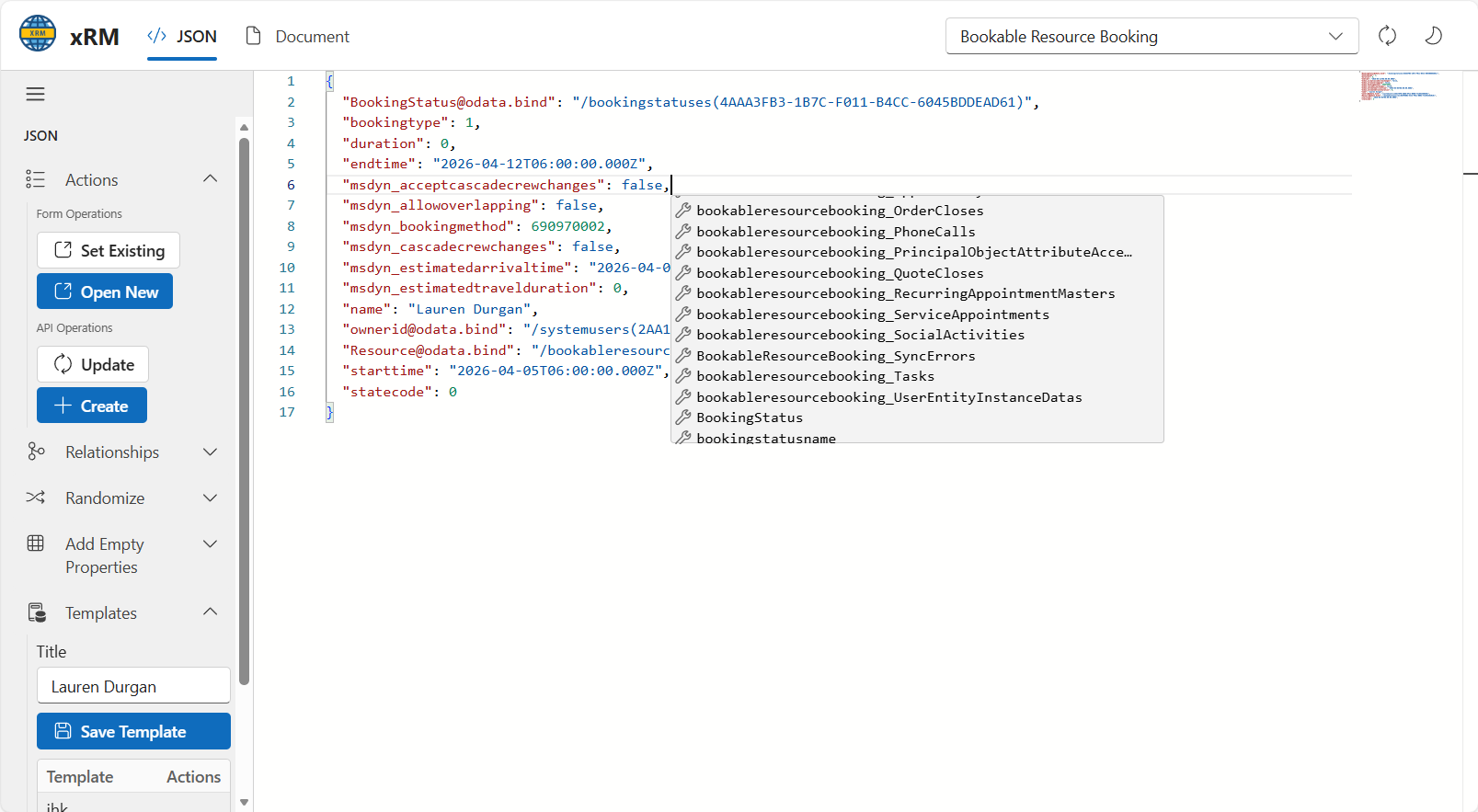
The screen includes:
- Form operations for opening existing records or creating new ones.
- API operations for update and create requests.
- Relationship helpers.
- Randomization tools for populating fields.
- Empty-property insertion.
- Template storage with save and action tabs.
Record testing flow
A typical test flow is:
- Open a record or create a new one.
- Use the JSON object manipulator or fake-value shortcut to populate fields.
- Save the result as a template if the same setup is reused.
- Reapply the template or randomizer on the next test record.