xRM MDA
xRM MDA is a browser extension for Power Apps model-driven apps and maker pages. It combines naming rules, record helpers, metadata exploration, and generated documentation in a single extension UI.
Install xRM MDA
Areas
- Popup (Contextual)
- Common (non-contextual)
- Environment navigator
ALT+N - Environment marker
- Table navigator
ALT+E
- Environment navigator
- org.crm.dynamics.com (metadata documentation, record manipulation/discovery)
- Record
- Fake fill
- Persistent actions (for debugging and testing)
- Templates: saved record field values as a preset to apply on focused record.
- God mode: keeps god mode on without the need to press the button while navigating through different forms.
- Show names: keeps showing form field's logical names without the need to press the button while navigating through different forms.
- Actions (with keyboard shortcuts)
ALT+GGod ModeALT+NLogical namesALT+CCloneALT+ICopy ID
- View (list)
- Process (classic workflows)
- Record
- make.powerapps.com & make.powerautomate.com (apply AI description, force naming conventions and dependency tracking)
- Publisher
- Table
- App
- Column
- Resource
- Flow
- Common (non-contextual)
- Applications
- MT: Metadata Tools
- Json manipulation of record
- Table documentation
- Forms
- Scripts
- Workflows
- Business rules
- Plugins
- Flows
- Diagrams
- Entity relationships
- Flows
- Security roles
- Field level security
- Export to word document
- RB: Rest Builder
- Raw edit
- Web resources
- Site maps
- Environment variables
- Flows
- Connections
- Actions
- Execute
- Custom API
- Custom Action
- Action
- Function
- Retrieve
- Retrieve Multiple
- Create
- Update
- Delete
- Associate
- Disassociate
- Execute
- Raw edit
- DSCO: Dataverse Solution Component Organizer
- Organize
- Select solutions that are ready to be organized, based on component types, to target solutions
- Set solution selection to favourites
- Save presets (save component type mappings to solutions)
- Execute moving components between solutions as selected presets
- Audit
- Audit changes within time interval to track maker's actions.
- Organize
- MT: Metadata Tools
Modes
- Local
- Sync user's preferences and presets to local machine.
- DEV
- Sync user's preferences and presets to user's cloud profile.
- TEAM
- Sync organization's preferences and presets to a web resource.
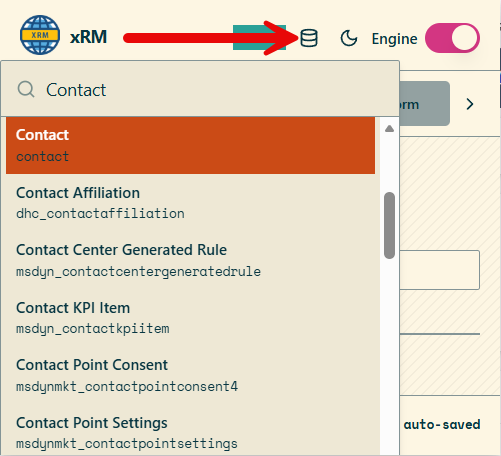
Navigation explorer
The header includes a navigation explorer that searches tables from anywhere in the model-driven application. Selecting an item navigates to the selected table so you can move between metadata surfaces without opening the maker portal navigation manually.
Metadata entry points
The extension exposes metadata tools in two places:
- List context: opens metadata tools for the entity behind the current view. Shortcut:
Alt+M. - Record context: opens metadata tools for the entity behind the currently opened record. Shortcut:
Alt+M.
Related pages
- See Naming Convention for rule configuration and supported contexts.
- See Productivity Tools for shortcuts, record actions, and the JSON object manipulator.
- See Documentation Tools for generated documentation, diagrams, and security views.
- See Privacy Policy for storage, host permission, and data access details.